Analyze your inventory
The Analyze page shows which products have expired, which expire next month, which have no expiry date and which have been in stock the longest. It also gives statistics such as total items in stock, stock value and your most used products.
Open the analysis
Press the Analyze button on the main screen or in the menu.
Expiry dates
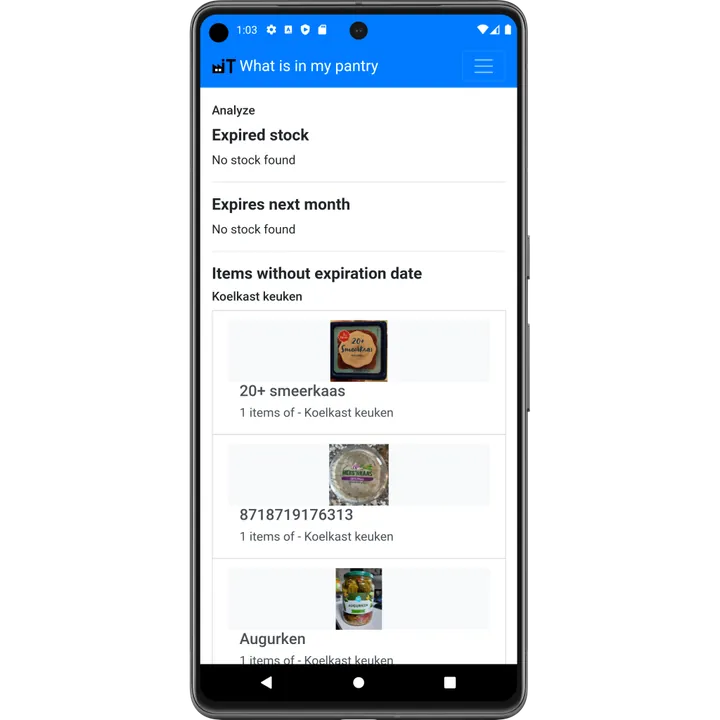
- Expired stock: check these products and throw away or use what is still good.
- Expires next month: plan your meals around these first.
- Items without expiration date: add a date to get the full picture.
- Longest in stock: forgotten products at the back of the cupboard.
Checking this list once a week is the easiest way to reduce food waste. For dinner inspiration based on what expires first, use the recipe ideas.
Statistics
- Total items in stock and number of transactions
- Top 10 products in stock, top 10 added and top 10 used
- Fullest storage location
- Inventory value and the 10 most expensive items (when prices are filled in)
- Inventory accuracy, based on your counts
Inventory analytics are part of the Advanced subscription.