Products
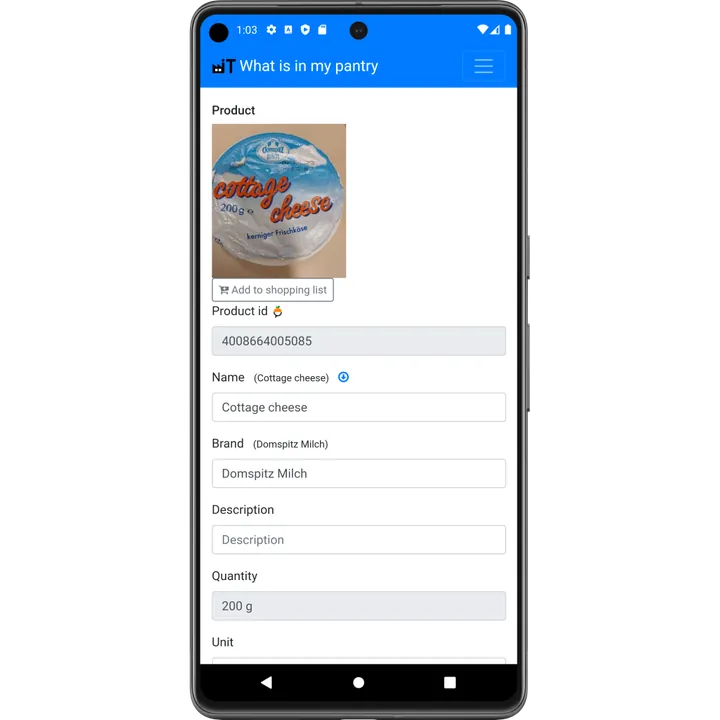
The Products page lists every product you use, with name, brand, barcode, photo and settings such as unit and minimum stock. When you scan a new barcode, the product is created automatically with information from Open Food Facts; you can change everything yourself.
Open the products
Press the Products button on the main screen or in the menu.
Automatic product information
For a new barcode, the app looks up the product in Open Food Facts, a free database with millions of food products worldwide. Name, brand, quantity and photos are filled in for you. Is information missing or wrong? Edit it in the app, or add it to Open Food Facts so everybody benefits.
Product settings
- Name, brand and description, shown in all lists.
- Unit and whether the product is divisible, for things like rice or flour.
- Minimum and maximum amount, used by replenishment to tell you what to buy.
- Price, used to calculate the value of your stock in the analytics.
- Add to shopping list, straight from the product page.
Products without a barcode
Fresh vegetables, bulk products or home-made meals have no barcode. Create them as your own product and select them by name when you add or remove stock.